Overview
Bloom Enterprise is an advanced visitor flow management system, integrating queueing and appointments management solutions. It has a web-based backoffice, allowing access to the system from any web-browser enabled device connected to the system’s network, facilitating the system management and customization.
Main features
Bloom Enterprise’s includes several modules, features, and devices that, together, build a complete visitor flow management system:
- Queue management – this module is the core function of Bloom Enterprise. It allows the configuration of the visitor flow according to the organisation’s service procedures, keeping queues organised and visitors informed. Those configurations can be replicated throughout all branches, or each location can have different queueing configurations.
- Appointments – this module allows the organisation to organise and plan their services and resources, by providing the visitors the possibility to previously book their visit. It is fully integrated with the queueing module.
- Virtual ticket – using the Virtual Ticket REST API, the organisation can develop mobile applications, or integrate this feature within an existing app, to allow visitors to check for the queueing status and generate a ticket outside the organisation’s premises.
- E-ticket – this contactless feature allows the organisation to display a QR code and provide a paperless alternative for visitors to get their ticket.
- Data and statistics – all data is displayed in charts and tables to allow the organisation to make data-driven decisions and have a global or local overview of their service performance.
- Communication – notifications can be configured to be sent to staff members when internal events are triggered, or visitors when key stages of the service flow are reached.
- Devices – there are different types of devices to complement the system, guiding the visitors through the service flow, and collecting feedback for further analysis.
Access to these features will depend on the modules you acquired.
Architecture
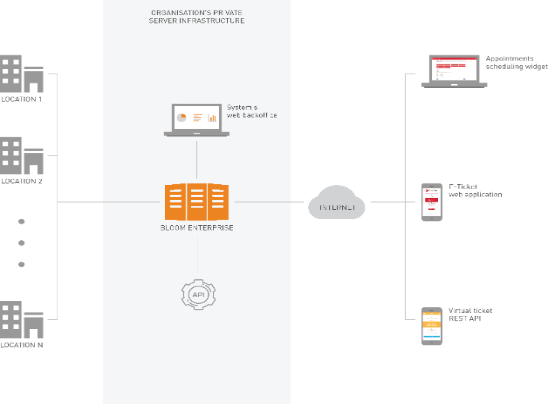
Bloom Enterprise software must be hosted in the organisation’s private servers' infrastructure. Being a private cloud architecture, it requires a continuous and stable connection between all local devices and central servers.
Figure 1 – System’s generic architecture
Bloom Enterprise software must be installed by Q-Better. The partner or customer must prepare the required infrastructure, and, at the time of installation, a direct access to the servers must be provided to Q-Better.
The installation of each location is based on connecting all devices and applications to the private servers and configuring all needed resources on the system’s backoffice. All local devices connect via TCP/IP to the switch that is connected to the private cloud network where Bloom Enterprise is installed.
Figure 2 – Location’s architecture
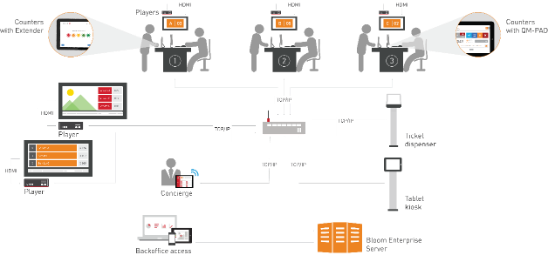
The Bloom Enterprise system provides real-time information, communicates with the locations, and handles all modules of the system.
Access to the internet is required to get online contents for the players, to communicate with online SMS gateways, to integrate the appointments booking widget in the organisation’s website, and to use the virtual ticket and e-ticket features.
Backoffice structure
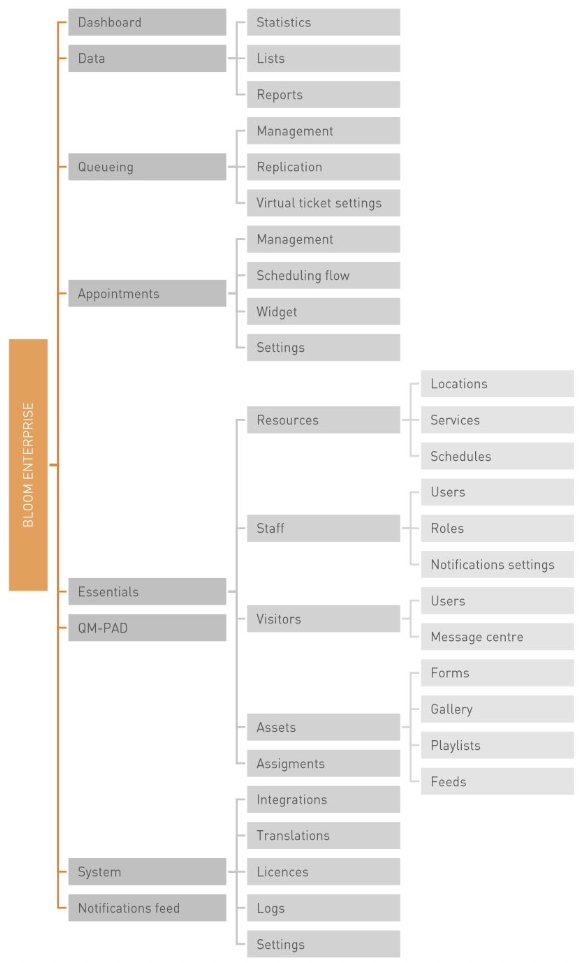
Bloom Enterprise’s backoffice is structured in the following way: