Ticket dispenser installation guide
Introduction
Bloom is an advanced service flow management system that provides the tools to design, manage and improve the service experience. With outstanding design and effortless usability, its modules allow full customization: from a single line to a complex service network. Bloom organizes thousands of services across industries, improving visitors, staff and managers experiences on a daily basis.
In this guide, you can find the instructions to install Bloom Enterprise ticket dispensers.
The ticket dispenser is a simple self-service solution for visitors to enter the queuing process. Allows the visitor to choose a service, or to check in for a previously booked appointment, and delivers a paper ticket. Its interface is customizable and can display and print all information in different languages.
Models
There are three available models:
- Q-DTC10W Compact 10.1"
- Classic
- Q-DTT10W/B 10.4"
- Q-DTT15W/B 15"
- Q-DTP15W/B Wallmount 15"
Package Contents
| Item | Classic Ticket Dispenser | Compact Ticket Dispenser | Wallmount Ticket Dispenser |
|---|---|---|---|
| Ticket dispenser | 1 | 1 | 1 |
| Thermal paper roll (57x30x11 mm) | 1 | 1 | 1 |
| External power supply | 1 | n.a. | n.a. |
| Power cable | 1 | 1 | 1 |
| Key | 2 | 2 | 2 |
| Floor anchor | n.a. | 1 | n.a. |
| Desk stand | 1 | n.a. | n.a. |
| Bolt | 2 M6 + 2 M5 | 1 M10 | n.a. |
| Nut | 2 M5 | - | n.a. |
The ticket dispensers are compatible with any thermal paper roll with a width of 57 mm, a diameter of 80 mm maximum, and a core of 11 mm.
Installation
To install a Bloom Enterprise ticket dispenser you must have:
- Connection to the Bloom Enterprise server;
- An Ethernet cable;
- A device to access the Bloom Enterprise’s backoffice.
Process
- Connect the player to the display using the HDMI cable.
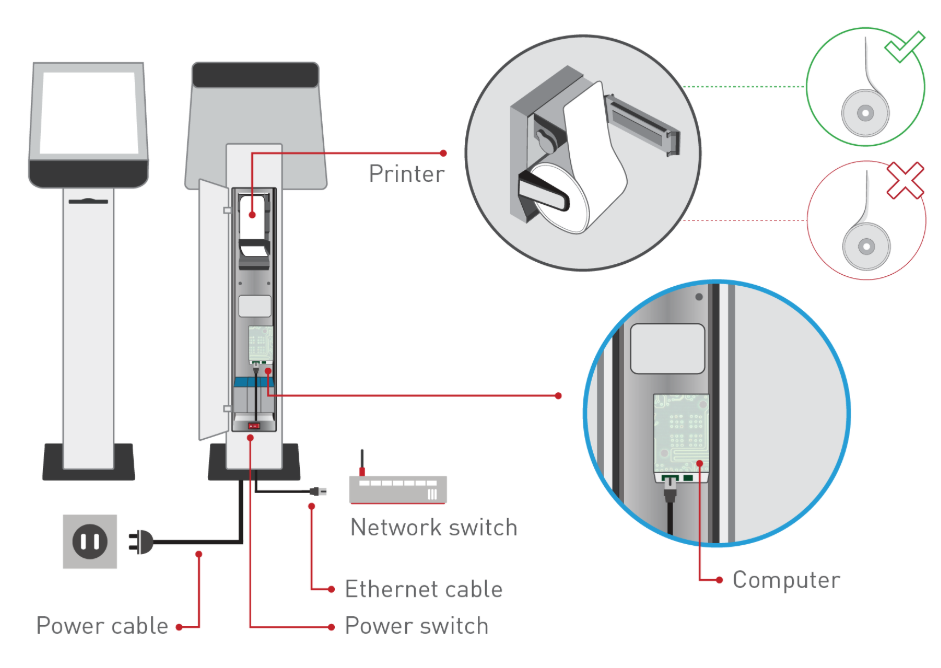
- Connect the player to the network switch using the Ethernet cable.
- Connect the keyboard and mouse to an USB port of the player.
- Power on the player by connecting the power adapter to an outlet (the player will start automatically, if not press the on/off button of the player).